Role
UX Designer
Duration
Sep, 2022 - Jan 2023
Team
2 Product Managers, 1 UX Researcher
1 UX Designer, 1 Technical Writers
1 UX Designer, 1 Technical Writers
Tools
Figma
Overview
AC3 Workflow 2.0 aims to revolutionize Amazon's customer service workflow by addressing current inefficiencies for CSAs (customer service associates), such as extended contact handling time, inaccurate information, and lack of guidance. The AI-powered workflow will provide CSAs with contextual information, easy access to resources, and consistent messaging, reducing manual effort and improving customer satisfaction.
By automating repetitive tasks and providing clear guidance, AC3 Workflow 2.0 will help CSAs deliver exceptional service and enhance the overall customer experience.
GenAI-driven workflows in Amazon customer care center (AC3)
By automating repetitive tasks and providing clear guidance, AC3 Workflow 2.0 will help CSAs deliver exceptional service and enhance the overall customer experience.
DEFINING THE PROBLEM
Customer problems
Extended time & effort on each contact
Customers are experiencing extended contact times due to repeating their issue throughout the contact and manual processes on the part of CSAs.
Inaccurate and inconsistent information from CSAs
Customers may receive inaccurate and inconsistent information from CSAs, leading to frustration and a lack of trust in Amazon customer service.
Customer in
self-service
self-service
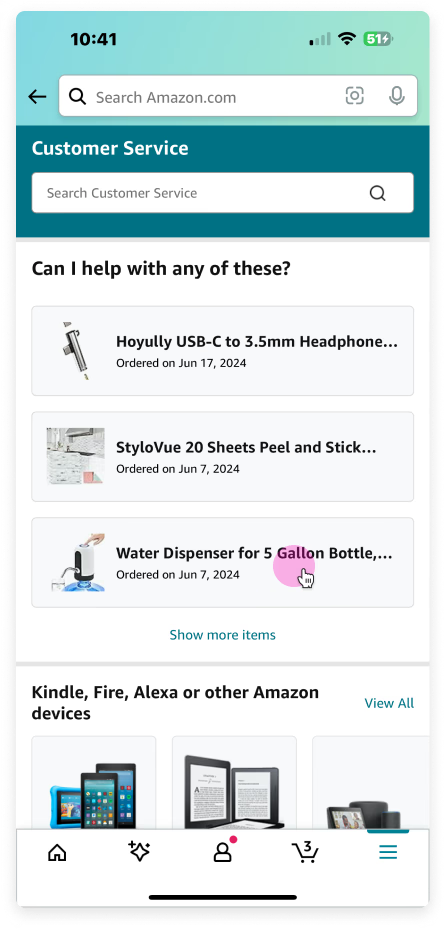
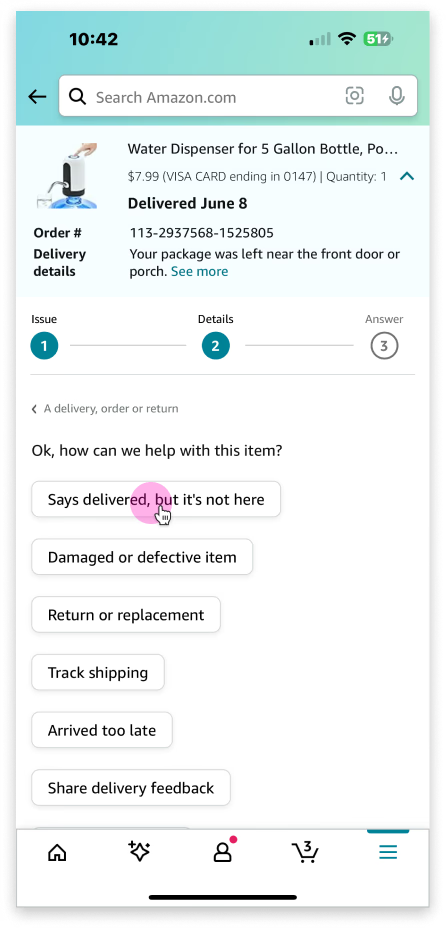
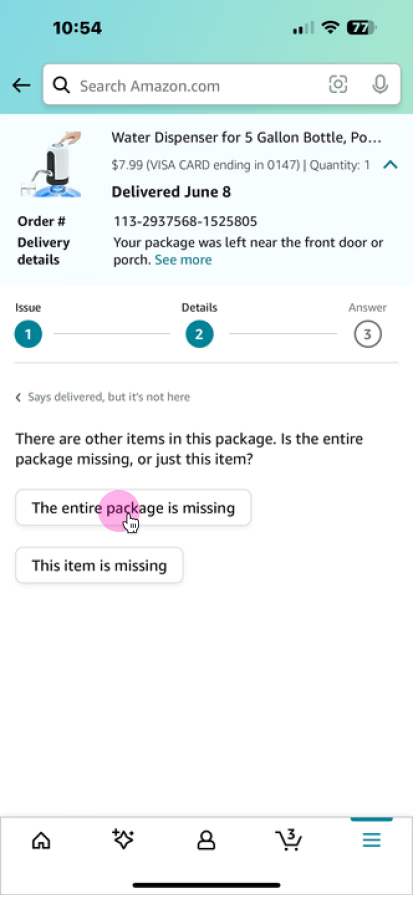
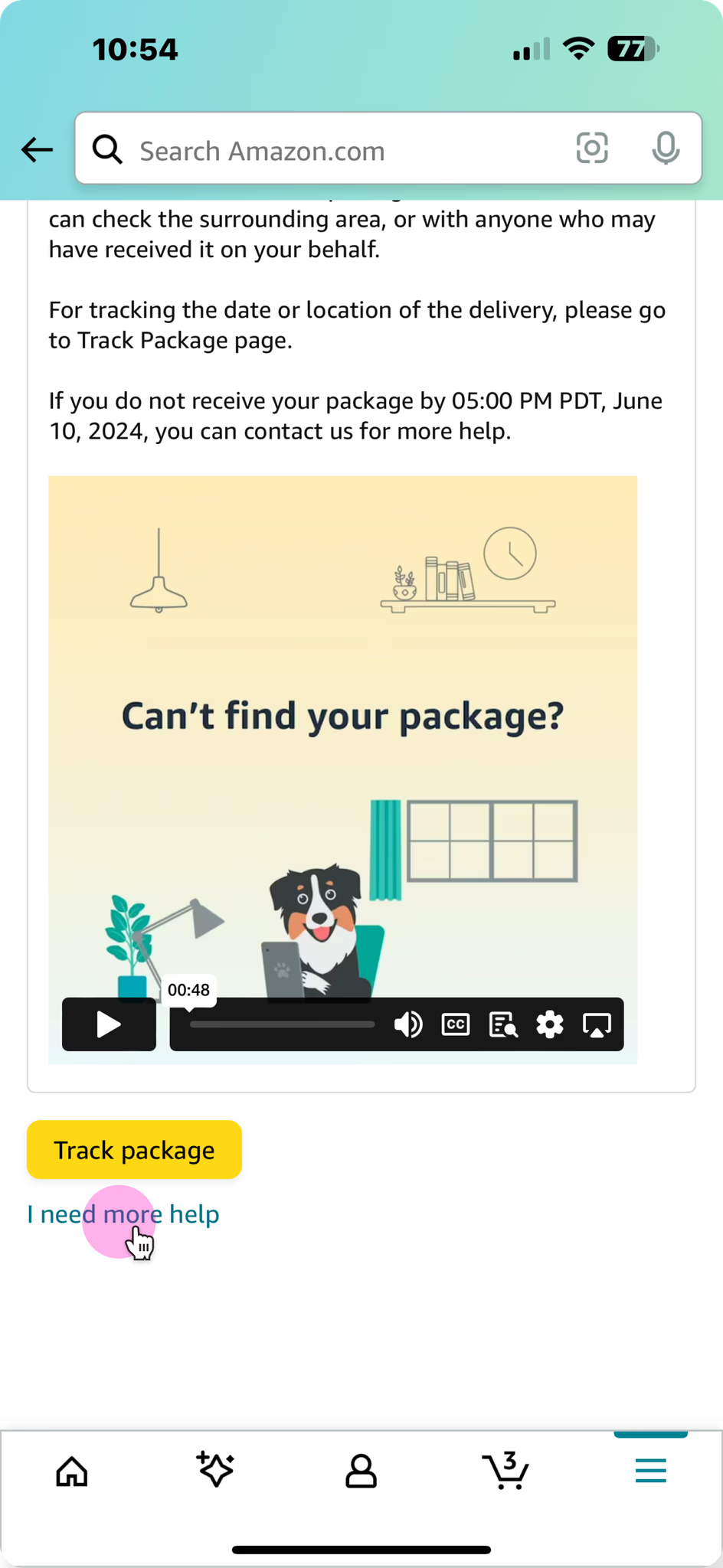
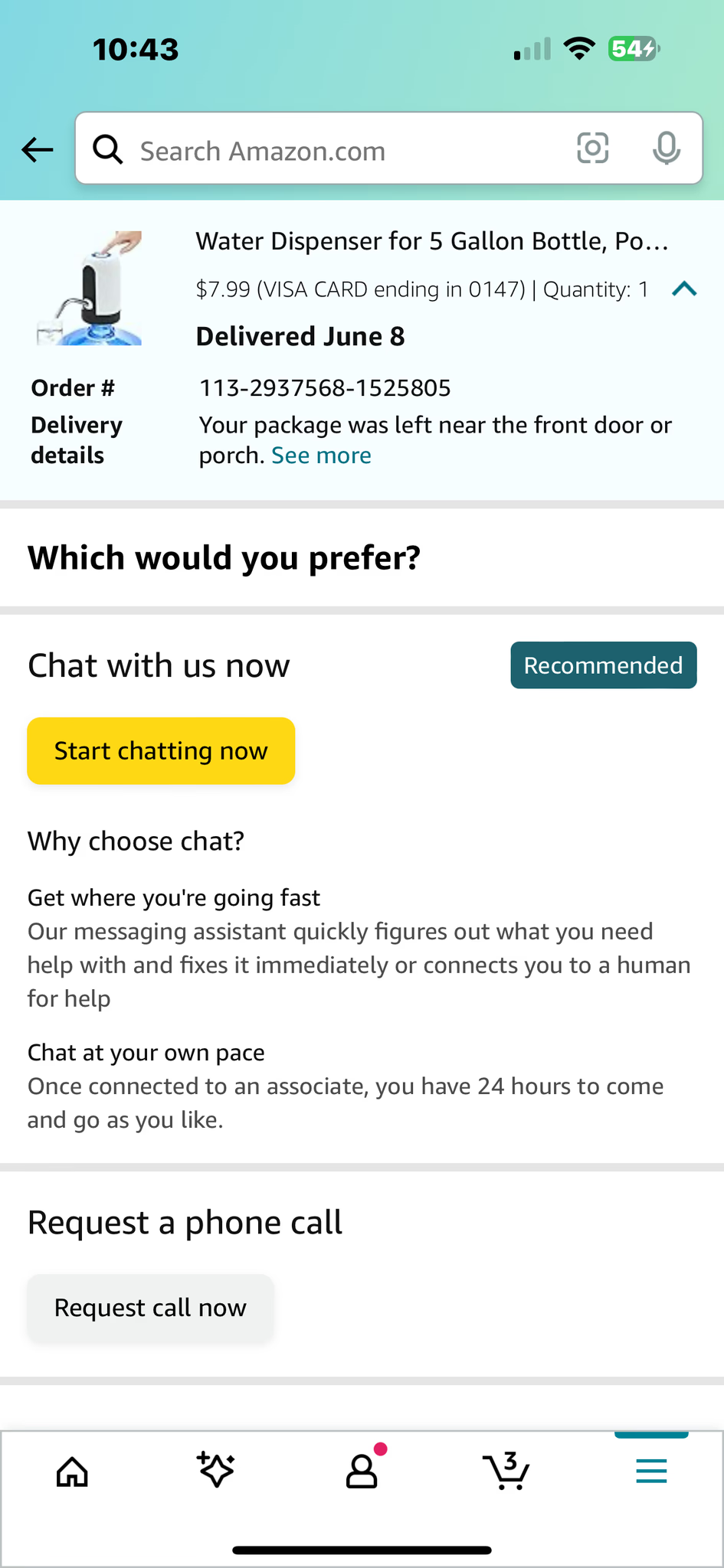
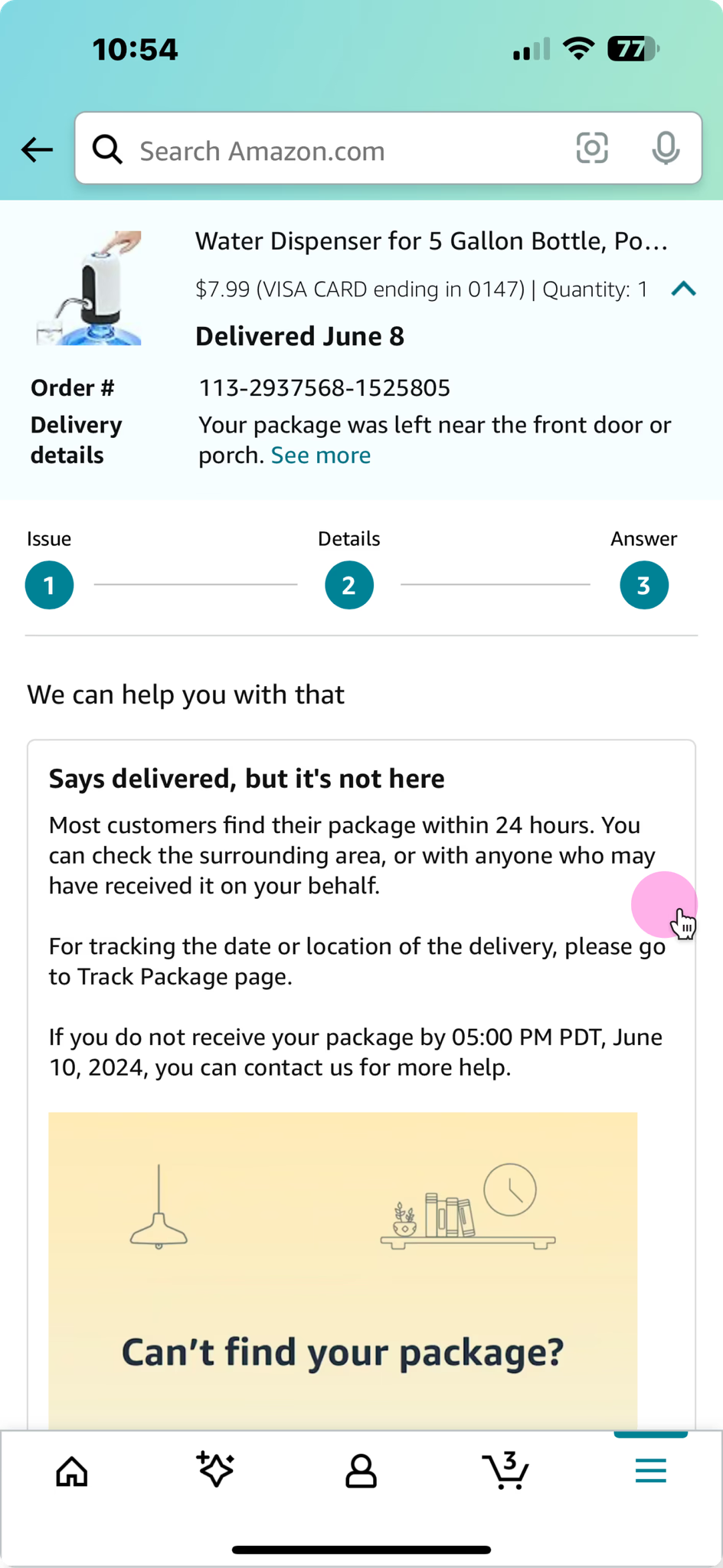
Customer wants to get a refund for missing package via self service.
Sandra ordered a water dispenser from Amazon that was marked as delivered, but she never received it.
Sandra ordered a water dispenser from Amazon that was marked as delivered, but she never received it.
She is requesting a refund for the undelivered item. Sandra starts by selecting the item and issue in Customer Service.
CSA in AC3
(Amazon customer care center)
(Amazon customer care center)
Problem 1: Repetitive info
CSA follows the existing questionnaire, often asking customers the same questions multiple times.
CSA follows the existing questionnaire, often asking customers the same questions multiple times.
Problem 2: Inaccurate and inconsistent information
CSA sometime sees inaccurate or conflict information on the same page.
CSA sometime sees inaccurate or conflict information on the same page.
Problem 3: Multiple resources
CSA needs to verify delivery status in the delivery tracker and often check the external carrier websites with tracking numbers.
CSA needs to verify delivery status in the delivery tracker and often check the external carrier websites with tracking numbers.
Problem 4: Manual effort
CSA needs to copies and pastes the content in the workflow to the chat.
CSA needs to copies and pastes the content in the workflow to the chat.
Vision
Our vision is to ensure customers spend the least amount of time and effort on a contact as possible while also getting accurate and consistent resolutions.
Solution
Design for reducing repetitive information
Design change: Replace static questionnaire with Gen-AI powered questionnaire
Description
When a CSA enters the new workflow, the system generates a response for CSAs.
Rationale
The AI can summarize the issue customer shares with CSAs from different channels, and generate necessary questions that can resolve customer's problems.
When a CSA enters the new workflow, the system generates a response for CSAs.
Rationale
The AI can summarize the issue customer shares with CSAs from different channels, and generate necessary questions that can resolve customer's problems.
Design for easy access to multiple resources
Design change: Power the questionnaire with data from different resources.
Description
The system generates a dynamic questionnaire to collect only the missing information based on the customer's context.
Rationale
By targeting only the gaps in data, the system avoids redundant questions, saving time and effort. Tailoring the questionnaire to the customer's specific context ensures relevance and improves engagement.
The system generates a dynamic questionnaire to collect only the missing information based on the customer's context.
Rationale
By targeting only the gaps in data, the system avoids redundant questions, saving time and effort. Tailoring the questionnaire to the customer's specific context ensures relevance and improves engagement.
Design change: Add related resources to the workflow for reference
Description
CSAs can also access the list of related sources used in generating the text through an expander.
Rationale
Providing visibility into the sources builds trust with customers, as CSAs can explain or reference the origin of the information. Access to related sources helps CSAs better understand the information being shared, enabling them to answer follow-up questions or provide additional details if needed.
CSAs can also access the list of related sources used in generating the text through an expander.
Rationale
Providing visibility into the sources builds trust with customers, as CSAs can explain or reference the origin of the information. Access to related sources helps CSAs better understand the information being shared, enabling them to answer follow-up questions or provide additional details if needed.
Design change: Provide access to specific policies
Description
Links to related sources open the article on CS Assistant in a new tab
Rationale
Providing visibility into the sources builds trust with customers, as CSAs can explain or reference the origin of the information. Access to related sources helps CSAs better understand the information being shared, enabling them to answer follow-up questions or provide additional details if needed.
Links to related sources open the article on CS Assistant in a new tab
Rationale
Providing visibility into the sources builds trust with customers, as CSAs can explain or reference the origin of the information. Access to related sources helps CSAs better understand the information being shared, enabling them to answer follow-up questions or provide additional details if needed.
Design for consistent messaging and reduced manual effort
Description
‘Add to chat' button
Rationale
To ensure consistent and clear messaging for customers, CSAs can send the generated message without manually copying and pasting.
‘Add to chat' button
Rationale
To ensure consistent and clear messaging for customers, CSAs can send the generated message without manually copying and pasting.
Description: CSA can send the generated text directly from the dropdown menu and also adjust the tone before sending it to the customer.
Rationale:This minimizes errors and simplifies the workflow, enabling CSAs to focus on resolving customer inquiries effectively.
Rationale:This minimizes errors and simplifies the workflow, enabling CSAs to focus on resolving customer inquiries effectively.
Description
The generated text is automatically populated in the chat input field. CSA can edit the text before sending.
Rationale
Automating the population of text saves time by reducing the need for CSAs to manually type or copy-paste responses, enabling faster customer interactions.
The generated text is automatically populated in the chat input field. CSA can edit the text before sending.
Rationale
Automating the population of text saves time by reducing the need for CSAs to manually type or copy-paste responses, enabling faster customer interactions.
Design for
AI inaccuracy
AI inaccuracy
Design change: add an escape hatch to the workflow
CSAs play a critical role in great customer service. If the LLM generates hallucinated or incorrect information during the workflow, the CSA can step in to help the customer.
Description
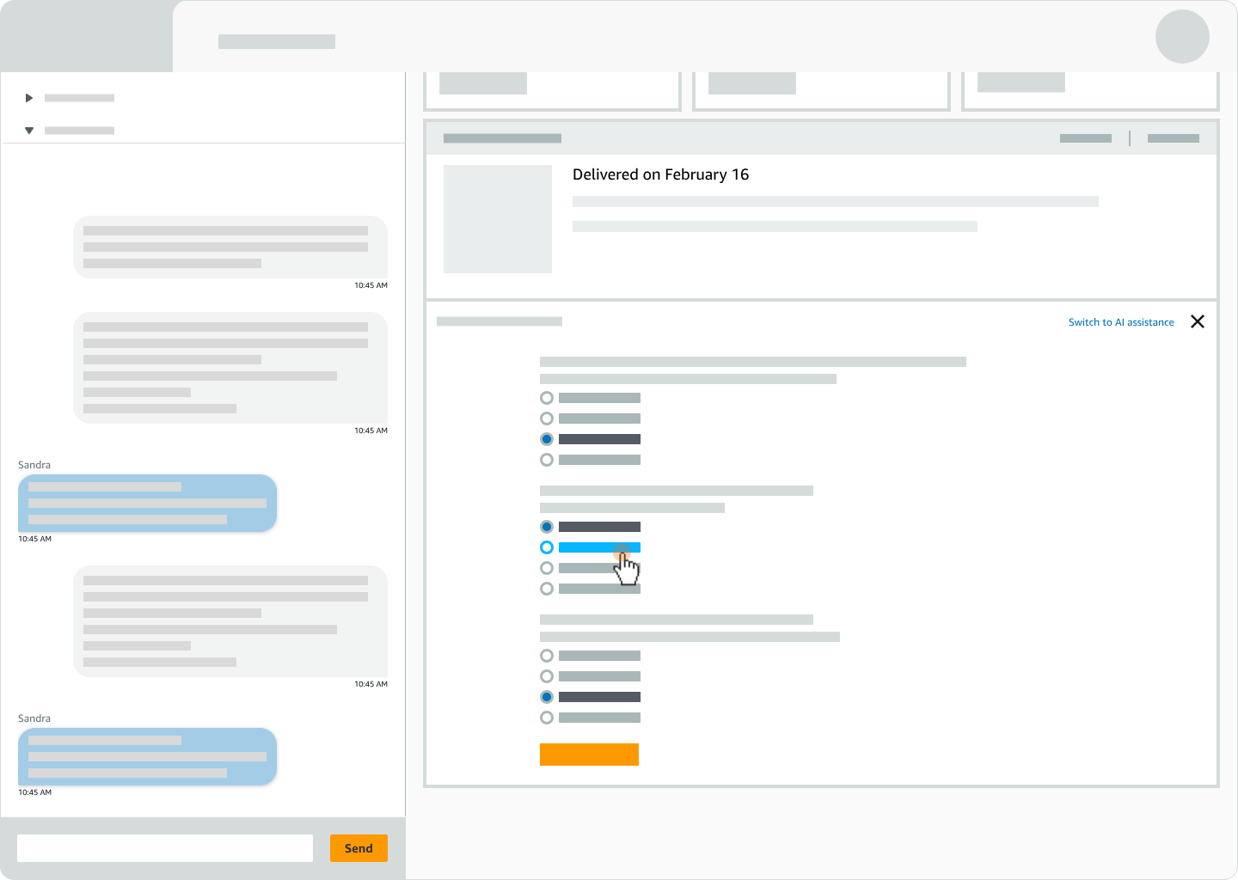
In manual mode, CSA has edited options to correct any inaccurate information
Rationale
By allowing CSAs to step in and edit or correct inaccurate information, the system mitigates the risks of LLM hallucinations or errors, maintaining high-quality service. This hybrid approach balances automation with human judgment, empowering CSAs to deliver accurate, personalized support while preserving the scalability of AI-driven workflows.
In manual mode, CSA has edited options to correct any inaccurate information
Rationale
By allowing CSAs to step in and edit or correct inaccurate information, the system mitigates the risks of LLM hallucinations or errors, maintaining high-quality service. This hybrid approach balances automation with human judgment, empowering CSAs to deliver accurate, personalized support while preserving the scalability of AI-driven workflows.
Description
CSA switches back to the AI-assisted mode, the system will generate a new response based on the edits made in manual mode.
Rationale
By generating a new response based on CSA edits in manual mode, the system ensures that the AI incorporates human-corrected information, improving future outputs. This creates a feedback loop that refines the AI's performance over time, while providing customers with accurate, contextually relevant responses.
CSA switches back to the AI-assisted mode, the system will generate a new response based on the edits made in manual mode.
Rationale
By generating a new response based on CSA edits in manual mode, the system ensures that the AI incorporates human-corrected information, improving future outputs. This creates a feedback loop that refines the AI's performance over time, while providing customers with accurate, contextually relevant responses.
Description
Switching to manual mode.
Even if the CSA switches to manual mode, the tasks completed in the AI workflow will not be reset, and they can continue working from where they left off.
Switching to manual mode.
Even if the CSA switches to manual mode, the tasks completed in the AI workflow will not be reset, and they can continue working from where they left off.
Description
The workflow feedback loop.
When CSAs override the AI suggestion and use manual mode, it signals the need to update the LLM. This allows the AI to learn and improve.
The workflow feedback loop.
When CSAs override the AI suggestion and use manual mode, it signals the need to update the LLM. This allows the AI to learn and improve.
Dependencies &Risks
Dependencies
Risks
AI accuracy
The AC3 Workflow 2.0 assumes that AI is accurate most of the time and that, in the off chance it is not, CSAs can use human intervention to provide an appropriate response or resolution.
Inflexible workflow
Today, CSAs have the power to make judgment, which is part of what makes the Amazon Customer Service a delightful experience. Will AI-generated workflows take that away from CSAs?
Work satisfaction for CSAs
Will an AI-generated questionnaire take away CSAs’ ability to make decisions and use human judgement? And if this is the case, would CSAs be satisfied in their roles? How does this impact the customer experience?
CSA trust with AI
CSA trust in AI is critical. CSAs need to feel confident that the AI-generated workflow is a tool in support of their work, that it’s accurately accomplishing what it’s intending to do. We don’t want CSAs to worry that it’ll take away their jobs.
Competing patterns
CSA might see multiple AI bots and AI assisted workflow on the same screens.
Next steps
Next steps
Collaborate with other AI related projects
We need to make sure the AC3 Workflow 2.0 works with all other AI related projects, such as CS Assistant, Context Summarizer, Smart Match, Smart Solve Card.
Connect with other product areas
Given that AC3 Workflow 2.0 can be applied universally across other product areas, we need to connect with verticals to ensure we’re creating a pattern that is reusable across their use cases.
Better understand the CSA experience
Collaborate with UXR to investigate opportunities to learn more about how CSAs interact and perceive AI.
Mitigate AI risk
We know AI isn’t always accurate, so we’ll need to work with tech to ensure we’re creating ways to de-risk AI inaccuracy.
Other case studies
Case management
UX Design, Case Study
Affinity Dashboard Redesign
UX Design, Case Study
Website Redesign
Website Redesign, branding
CSA’s problems
Workarounds
CSAs aren’t able to get the resolution customers want, so they use workarounds to get a different outcome.
Manual effort
CSAs need to manually select options based on customers answers and then copy paste replies into chat.
Repetitive info
CSAs have to sort through unnecessary options to find the one that’s appropriate for the customer.
Multiple resources
CSAs need to jump around to different resources to get the right information.
Design principles
Design principles
Q:How can AI be used to empower humans and enhance their capabilities?
A: AI can significantly empower customer service associates by automating routine tasks and augmenting their problem-solving abilities. AI can analyze vast amounts of data to provide real-time insights into product performance and customer sentiment, helping associates make informed decisions.
Additionally, AI can suggest potential solutions or relevant knowledge articles, accelerating resolution times. By combining the efficiency of automation with the empathy and creativity of CSAs, AI can enhance the overall customer experience and job satisfaction of the associates.
Additionally, AI can suggest potential solutions or relevant knowledge articles, accelerating resolution times. By combining the efficiency of automation with the empathy and creativity of CSAs, AI can enhance the overall customer experience and job satisfaction of the associates.
Q:What are the design principles we follow when designing AI-assisted workflows?
A:Let Users Give Feedback: Incorporate a feedback mechanism to gather user insights. This allows for continuous improvement and refinement of the AI system based on real-world experiences.
Let Users Supervise Automation: Empower users to oversee automated processes. This includes the ability to review, edit, or override AI-generated suggestions, maintaining human control.
Give Control Back to the User When Automation Fails: Design the system to gracefully handle errors and failures. If the AI system encounters difficulties, it should seamlessly transfer control back to the user.
Be Accountable for Errors: Take responsibility for any errors or biases that may arise from the AI system. Implement measures to mitigate these risks and provide transparent explanations.
Make it Safe to Explore: Encourage experimentation and learning by creating a safe environment for users to interact with the AI system. Minimize the risk of negative consequences and provide clear guidance.
Let Users Supervise Automation: Empower users to oversee automated processes. This includes the ability to review, edit, or override AI-generated suggestions, maintaining human control.
Give Control Back to the User When Automation Fails: Design the system to gracefully handle errors and failures. If the AI system encounters difficulties, it should seamlessly transfer control back to the user.
Be Accountable for Errors: Take responsibility for any errors or biases that may arise from the AI system. Implement measures to mitigate these risks and provide transparent explanations.
Make it Safe to Explore: Encourage experimentation and learning by creating a safe environment for users to interact with the AI system. Minimize the risk of negative consequences and provide clear guidance.